Amigo - Chat & Video Party
- 4.3
- Rating
- 5.00M
- Installs
- Free
- Price

 Analysis by App-foxy
When I try a social app like Amigo, I do not judge it only by how quickly it puts new people on screen. I also pay attention to whether I can understand what is happening, move through the interface without unnecessary effort, and decide when interaction is comfortable for me. That matters here because Amigo - Chat & Video Party is built around discovering interesting people, with conversation and video interaction at the center of the experience.
My overall impression is of a free social app that is easy to approach but not equally suitable for every situation. It can be appealing when I want spontaneous contact rather than a carefully managed profile or a long-term community. At the same time, that open-ended format means I need to be more deliberate about privacy, attention, and personal boundaries. The app is rated for mature users, so I would not treat it as a casual platform for children or younger teenagers.
Amigo comes from Insight-Innov and sits in the social category. It has reached over five million installs and holds an average rating of 4.3 from around 8.4 thousand ratings, which suggests that its basic idea connects with a substantial audience. It is free to install, although optional purchases range from small amounts to considerably higher-priced items. I would therefore approach it as a free starting point, not as an experience where every interaction is guaranteed to remain cost-free.
You May Also Like

 Blood Strike: 2.5 Anniversary
Blood Strike’s Loadouts Turn Every Drop Into a Tactical Gamble
A close look at Blood Strike’s custom loadouts: how fast access to signature weapons reshapes its battle royale rhythm, rewards preparation, and narrows the gap between fights.

 Pandora - Music & Podcasts
Pandora’s Music Is Easy to Start, but Harder to Recover
Pandora’s strength is its low-effort path from a seed to a station. Its weak spot is how much confidence it asks you to place in connection, setup, and quiet recovery.

 8 Ball Pool
 Is Built on Rivalries, Rematches, and Routine
A close look at the rivalries, rematches, shared routines, and unanswered safety questions that turn a quick pool match into a persistent mobile community.

 Samsung Music
’s Quiet Strength Is Playing What You Already Own
Its reach comes less from spectacle than from dependable access to a personal library. That simplicity is both the app’s strongest retention engine and its ceiling.

 AccuWeather: Weather Radar
AccuWeather Review: A Quick, Clear Forecast for Everyday Decisions
For everyday plans, the best forecast is the one you can understand quickly. AccuWeather makes rain timing, radar, and local conditions easy to act on, with a few trade-offs.

 Hill Climb Racing
Why Hill Climb Racing Still Turns Crashes Into One More Run
A tiny car, a bumpy hill and one more upgrade: Hill Climb Racing keeps resurfacing because its simple chaos makes every near-miss feel personal.
More From Our News Desk
View All News


How clearly the app presents people and conversation
I find it useful to judge Amigo not just by whether someone catches my attention, but by how much context I can take in before deciding to engage. In this section, I’m looking at how the presentation supports that choice and where a little patience can make discovery feel more comfortable. That leads naturally to the bigger question of whether the experience stays worthwhile after the first few visits.
Readability and navigation in everyday use
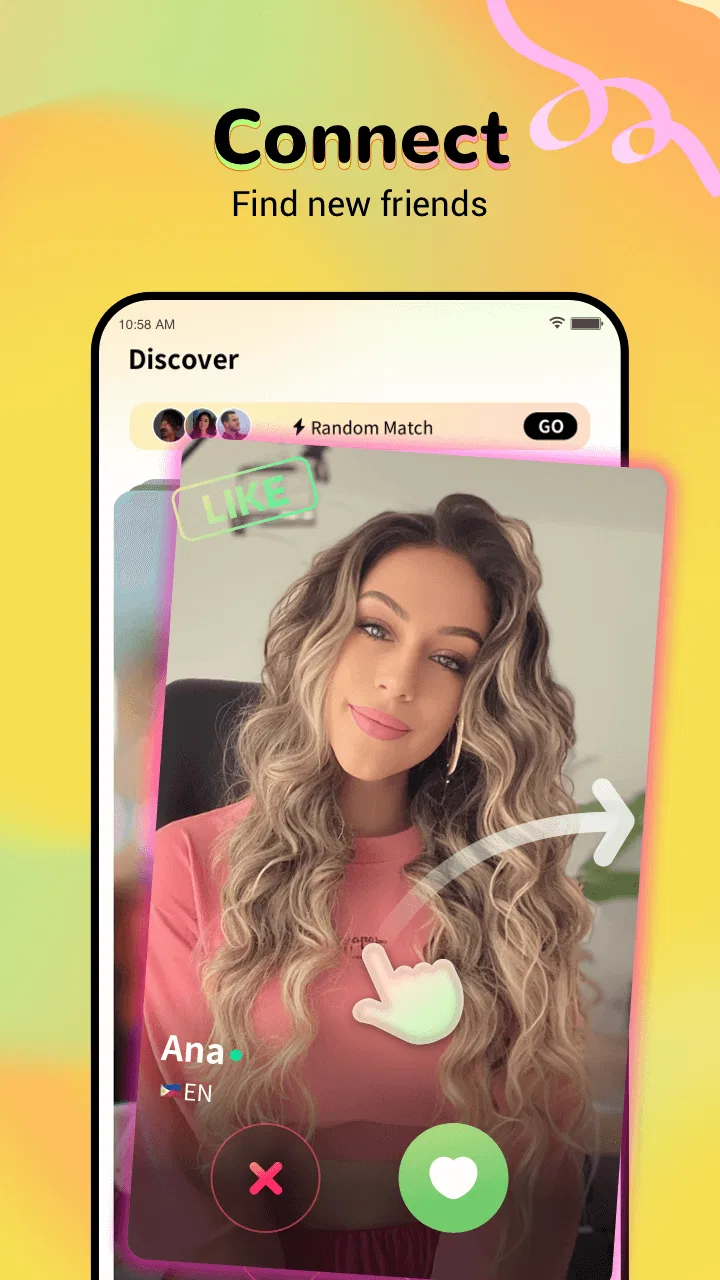
The central promise is straightforward: open the app, look through social possibilities, and decide who seems interesting enough to engage with. That simplicity is useful for someone who does not want to build a detailed dating-style profile or join a complicated forum. I can understand the purpose quickly because the whole experience is focused on people rather than a crowded collection of unrelated tools.
For me, the most important readability question is not whether the first screen looks attractive. It is whether I can distinguish a person’s identity, the available interaction, and the next action without having to guess. Social discovery apps can become tiring when profiles, prompts, icons, and invitations compete for attention. I would use Amigo more comfortably in short sessions, pausing to check what I am selecting instead of tapping through quickly.
That habit is especially helpful for users who read more slowly, have difficulty processing dense screens, or simply prefer predictable navigation. I would recommend enlarging the phone’s system text where possible and checking whether the resulting layout remains comfortable before spending much time in the app. I would also keep notifications selective at the device level. Frequent alerts can make a social app feel demanding even when the underlying navigation is simple.
The current version is 4.3.6, and the app supports Android 7.0 or later. That broad compatibility is useful for people using older phones, but an older device can still make a social experience less comfortable if video or rapid screen changes strain its performance. I would judge the app on the phone I actually use, not only on whether the operating system meets the minimum requirement.
Choosing between discovery and conversation
A useful way to approach Amigo is to separate browsing from interaction. I would first spend a few minutes understanding how people are presented and what each control does. Only after that would I start conversations or accept invitations. This creates a small buffer against accidental actions, which is valuable for anyone who finds fast, gesture-heavy interfaces difficult.
That workflow also helps with attention. If I open the app while commuting, waiting in a queue, or taking a short break, I can browse without feeling obliged to answer immediately. When I have more time and a quieter setting, I can decide whether a conversation deserves my focus. The distinction sounds minor, but it makes spontaneous social apps easier to fit around real life.
I would not expect Amigo to replace a messaging app where I already know the people involved. Traditional messengers are usually better for reliable contact with friends, while established communities are often better for shared interests and ongoing discussion. Amigo’s appeal is the discovery step: it gives me a way to encounter people outside my existing circle. That is also its main uncertainty, because a new contact may not match my expectations or communication style.
For users who rely on screen readers, magnification, switch access, voice control, or other assistive tools, the sensible approach is to test the key path rather than assume every control will behave perfectly. The important test is whether a person can identify profiles, understand invitations, start or end an interaction, and leave the app without assistance. I would do that before making purchases or sharing personal information.
Motor and sensory considerations
Video-oriented social interaction can place more demands on a user than text alone. A person may need to hold a phone steadily, respond to changing visual content, manage sound, and decide quickly whether to continue. That does not make the app inaccessible by definition, but it does mean the most comfortable use depends heavily on the user’s environment and preferences.
If I am sensitive to bright screens, movement, or sudden sound, I would begin with the phone’s brightness and volume set low. I would also avoid opening the app in a dark room or noisy public place until I understand how much visual and audio activity it creates. Headphones may make conversation easier in some situations, but they can also reduce awareness of the surroundings, so I would use them selectively.
For someone with limited fine-motor control, the key issue is whether buttons are easy to target and whether an accidental tap can be reversed. I would slow down rather than rely on rapid swipes, keep one hand free to stabilize the phone, and use the device’s accessibility settings if they make touch interaction more manageable. A stand can help during longer video conversations because it removes the need to keep holding the phone at the same angle.
Text-first users may find a video-party concept less comfortable than a conventional chat service. If I want time to compose replies, avoid showing my surroundings, or communicate without speaking, I would prefer an app designed primarily around messaging. Amigo may still be useful for discovering people, but I would not force myself into live interaction simply because it is available.
There is also a social sensory issue: spontaneous conversations can be unpredictable. Some users enjoy that energy, while others need clear context before engaging. I would treat the ability to pause, leave, or ignore an invitation as part of the app’s practical accessibility. A social product is easier to use when I can control the pace instead of having to respond immediately.
Situational access: where Amigo fits best
The most realistic use case for me would be a short evening session at home. I might open Amigo after finishing other tasks, browse for a few minutes, and start a conversation only if I have enough privacy and attention for it. In that setting, I can control the room’s lighting, reduce background noise, and stop whenever the interaction becomes tiring. That is a much better fit than trying to use it while driving, working, or moving through a crowded place.
Another reasonable scenario is meeting people when I have recently moved somewhere unfamiliar or want contact beyond my usual social circle. The discovery angle can feel more immediate than joining a large forum and waiting for a discussion to develop. Still, I would keep early conversations general. I would not share my home address, workplace routine, financial details, or private images with a new contact merely because the conversation feels friendly.
Someone with a fluctuating energy level may appreciate the ability to use the app in brief visits rather than committing to a scheduled group. I can browse when I feel prepared and leave when concentration drops. That flexibility is one of the stronger arguments for a discovery-based social app. It becomes less useful when the user needs dependable, structured communication with known people.
The mature age rating is important in deciding where and with whom the app belongs. I would keep it away from children’s devices and would not assume that an adult social environment is appropriate for a younger family member. Adults who are uncomfortable with unexpected conversations should also prepare a simple exit routine: end the interaction, block or report where available, and close the app rather than debating with someone who ignores boundaries.
Cost is another situational consideration. Since the app is free, I can explore its basic purpose without paying at the start. However, optional items can cost from twenty cents to nearly two hundred and fifty dollars each. I would disable or protect in-app purchasing on the device if accidental spending is a concern, and I would never buy something simply to keep a stranger’s attention. The free entry point is useful, but the purchase range deserves active caution.
What still creates friction
The biggest barrier is uncertainty. Discovering people is not the same as finding compatible people, and a polished profile or engaging first exchange does not tell me how respectful a contact will be over time. Users who want strong identity checks, carefully organized interest groups, or a familiar friend network may feel more secure with a different kind of social service.
Video can also expose more than I intend. Even without discussing private information, my room, clothing, background noise, or nearby people may enter the interaction. I would check the camera angle and surroundings before starting, and I would avoid using the app in places where other people could be recorded or overheard without their agreement.
Another limitation is cognitive load. The promise of meeting interesting people can encourage repeated checking, especially when conversations arrive unpredictably. That may be enjoyable for some users but exhausting for others. I would set a personal stopping point before opening the app, such as one short session, rather than letting notifications decide how much attention I give it.
People who communicate best through captions, text, translation, or carefully paced exchanges should test whether the available interaction style meets their needs. I would not choose Amigo as my only communication tool if I needed guaranteed text alternatives or a highly structured accessibility experience. A conventional messenger, an interest-based community, or a platform designed around slower conversation may be the better primary option.
There is also a practical difference between an app being technically usable and being socially comfortable. A person may be able to tap every control but still find live discovery stressful, distracting, or too exposed. My advice is to judge both questions separately. If the interface works but the social format feels wrong, changing settings will not solve the main problem; choosing a different type of app will.
My inclusive verdict
I see Amigo as a useful option for adults who want low-commitment social discovery and are comfortable setting their own boundaries. Its free starting point, focused purpose, and large existing audience make it easy to try. The mature rating, optional purchases, and open-ended contact model mean that trying it responsibly requires more than simply installing it.
For the best experience, I would use it in a quiet, private setting, keep sessions short, control notifications, and separate browsing from replying. I would also test the core actions with my phone’s accessibility settings before relying on the app for regular communication. Those steps do not promise that every user will find the interface ideal, but they make it easier to identify whether the app fits a particular way of seeing, hearing, moving, and communicating.
I would recommend it to an adult who enjoys meeting unfamiliar people and can comfortably leave conversations that do not feel right. I would steer a child, a user seeking a tightly moderated specialist community, or someone who needs a text-first and highly predictable service toward another option. In my experience, the real strength of Amigo is flexible discovery, while its real trade-off is the responsibility that comes with unstructured social contact.
Insight-Innov has made a social app that is easy to understand at the broadest level: it is a place to encounter people beyond the contacts already in my phone. Whether that becomes a positive experience depends on pacing, privacy habits, sensory comfort, and the user’s expectations. If those conditions suit you, Amigo is worth exploring as a free social experiment. If you need certainty, quiet text communication, or a carefully organized community, I would choose a more specialized alternative instead.
FAQs for Amigo - Chat & Video Party
01What is Amigo - Chat & Video Party, and how does it work?
Amigo - Chat & Video Party is a social communication app designed for meeting people through live video chats, party rooms, and interactive conversations. After creating a profile, users can browse available rooms or connect with other participants. Depending on the feature, you may be able to send messages, join group conversations, use video, and interact through virtual gifts or other in-app tools.
02Is Amigo - Chat & Video Party free to download and use?
The app can generally be downloaded without an upfront purchase, but some features may require in-app payments. Basic social functions can be available at no cost, while virtual gifts, premium interactions, special rooms, or other optional services may use coins or subscriptions. Before spending money, review the current pricing, renewal terms, and payment settings shown in the app store and inside the application.
03Does Amigo require access to my camera, microphone, or personal information?
Video and voice features normally require access to your device’s camera and microphone, while notifications, contacts, storage, or location permissions may depend on the functions you choose to use. You can manage these permissions through Android or iOS settings. It is worth checking the privacy policy and granting only the access needed for the features you intend to use.
04Is Amigo - Chat & Video Party safe for meeting and chatting with strangers?
As with any live social or video-chat platform, users may interact with people they do not know, so caution is essential. Avoid sharing your address, passwords, financial details, private documents, or intimate content. Use available block and report tools when necessary, review a person’s behavior before continuing a conversation, and remember that profiles or information supplied by other users may not always be genuine.
05What should I check before downloading Amigo on Android or iPhone?
Before installing Amigo - Chat & Video Party, check that your device meets the app’s current operating-system requirements and has enough free storage for updates and media features. Also review recent user feedback, the developer information, privacy disclosures, age rating, subscription details, and permissions. A stable internet connection is recommended because video rooms can consume significant mobile data and battery.
Pros
- Quick video chats make it easy to meet new people.
- Party-style rooms create a lively
- social atmosphere.
- Useful filters help users discover people with shared interests.
- The interface is simple to navigate for first-time users.
- Available on mobile
- making conversations convenient anywhere.
Cons
- Some features may require in-app purchases or virtual credits.
- User quality and availability can vary depending on your region.
- Video interactions may consume significant mobile data.
- Public chats can include inappropriate or unwanted behavior.
- Privacy settings should be checked carefully before sharing personal details.

Amigo - Chat & Video Party
Gallery